WIT Loadout
What it does
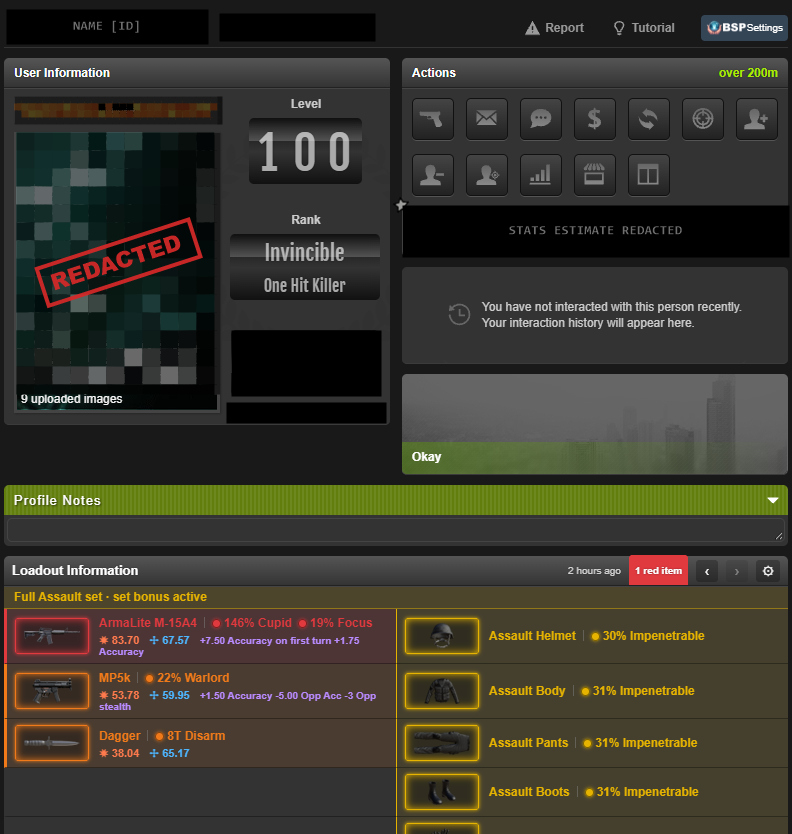
Open any player's profile, or start an attack, and a Loadout Information panel shows the last gear a WIT member saw them wearing: weapon and armor pictures, rarity, bonuses, quality, damage, accuracy and armor.
On the attack screen it's laid out like Torn's own fight screen: weapons on the left, the player in the middle, armor on the right. Once the fight starts, it switches to what they're wearing right now.
Install on a computer
- Install Tampermonkey for your browser: Chrome, Edge, Firefox or Brave. On Firefox, use Tampermonkey, not Greasemonkey.
- Click Install the script, then Install on the Tampermonkey page that opens.
- Open any Torn profile. Paste a Public API key into the box in the Loadout panel and press Save.
For WIT family members only (Premier · Mayhem · Horizon). Other players get a "members only" message.
Install on a phone BETA
Still being tested on phones. If something doesn't work, message the Reverend in game, with a screenshot if you can.
Torn PDA
- In Torn PDA, open Settings → Advanced browser settings, turn on Enable custom user scripts, then tap Manage scripts → +.
- Tap Configure, put https://tornreverend.com/wit-loadout.user.js in Remote URL, tap Fetch then Load, and save. (Pasting the code works too: set Injection time to START.)
- Open any Torn profile. The script uses the API key you already gave Torn PDA, only to confirm you're in WIT. If it asks, paste a Public key into the panel instead.
Firefox on Android
Install the Tampermonkey add-on in Firefox, then follow the computer steps above. This is the newest way to run it, so screenshots of how it looks are welcome.
Plain phone browsers (Chrome or Safari without add-ons) can't run userscripts.
Your API key
A Public access key is all it needs. To make one: in Torn, open Settings → API Keys, create a new key with Public access, and name it something like "WIT Loadout".
- Your key only goes to the WIT Loadout server, which asks Torn if you're in a WIT faction and keeps a scrambled hash of the key, never the key itself. It rechecks about once an hour while you use it.
- Your browser remembers the key, so you only paste it once.
- To change it, click the ⚙ on the panel. In Torn PDA, leave the box empty and tap Save to go back to the key you gave Torn PDA.
- Never give anyone a Full access key for this. It doesn't need one.
Reading the panel
The header
Each item
Bonuses (like Expose 12%) sit next to the item name. Hover over one for Torn's description. Weapon mods are listed after the stats.
Banners
- Full X set: they're wearing every piece of one armor set.
- ✝ Blessed by the Reverend: shows on about 1 in 3 screens. Just for luck.
The bottom of the panel shows how many loadouts, players and members the family has, plus the top scout. Hover over the top scout to see the full leaderboard.
Where the data comes from
From us. Torn shows a defender's gear once a fight starts, and the script quietly records it and shares it with the family. Nobody has to do anything extra: just fight with it installed.
If someone's gear hasn't changed, the existing record just gets a newer date, so the history only grows when they actually swap gear. The more members run it, the more targets we can read.
Updates
- Tampermonkey updates the script by itself, about once a day. To update right away: click the Tampermonkey icon, then Utilities → Check for userscript updates.
- Torn PDA doesn't update scripts by itself. When a new version comes out, open Manage scripts, tap refresh, then Review.
Troubleshooting
"No saved loadout for this player yet."
Nobody in WIT has fought them with the script on yet. Hit them once and the next person to look will see their gear.
"That doesn't look like a Torn API key."
A key is 16 letters and numbers. Copy it again from Torn's API Keys page; spaces are removed for you.
"Only for WIT family members."
The key belongs to someone who isn't in Premier, Mayhem or Horizon right now. If you've just joined, try again a little later. If you pasted someone else's key by mistake, click ⚙ and paste your own.
"This browser blocks the WIT loadout server."
Your browser isn't letting the script talk to the server. Use Tampermonkey on a computer, Firefox with Tampermonkey on Android, or Torn PDA.
"Could not reach" or "timed out"
Reload the page. If it keeps happening, message the Reverend in game.
The panel doesn't show up at all
Click the Tampermonkey icon on a Torn page and check that Tampermonkey is on and WIT Loadout is switched on. Then reload the page. In Torn PDA, check that custom user scripts are enabled and the script is turned on.
"Too many new API keys tried from here."
Lots of different keys were tried from one connection in a short time. Wait about ten minutes, then try again with your own key.
Still stuck?
Message the Reverend in game. A screenshot of the panel helps.
Privacy
- The server never stores your API key, only a one-way scrambled hash of it.
- It stores the gear Torn shows during fights, who it belongs to, when it was seen, and which member recorded it (for the top scouts list).
- Only members of WIT family factions can read the loadouts.